

.svg.png)


Creating a Branding
You can create a Branding in the image of your company for your signature shipments
Prerequisites
✓ Have an existing App account
✓ Be a Gonexa Sign customer
✓ Have updated the package to at least version 2.3
Create a Branding for your signature shipments
To strengthen your company's visual identity and offer a consistent experience to your customers, the Gonexa App allows you to create a Branding tailor-made for your electronic signature shipments
- Connect to the Gonexa App
- Go to the “Sign” tab then “Branding”
- Click "New Branding"
- Enter a name to identify your branding, then save.
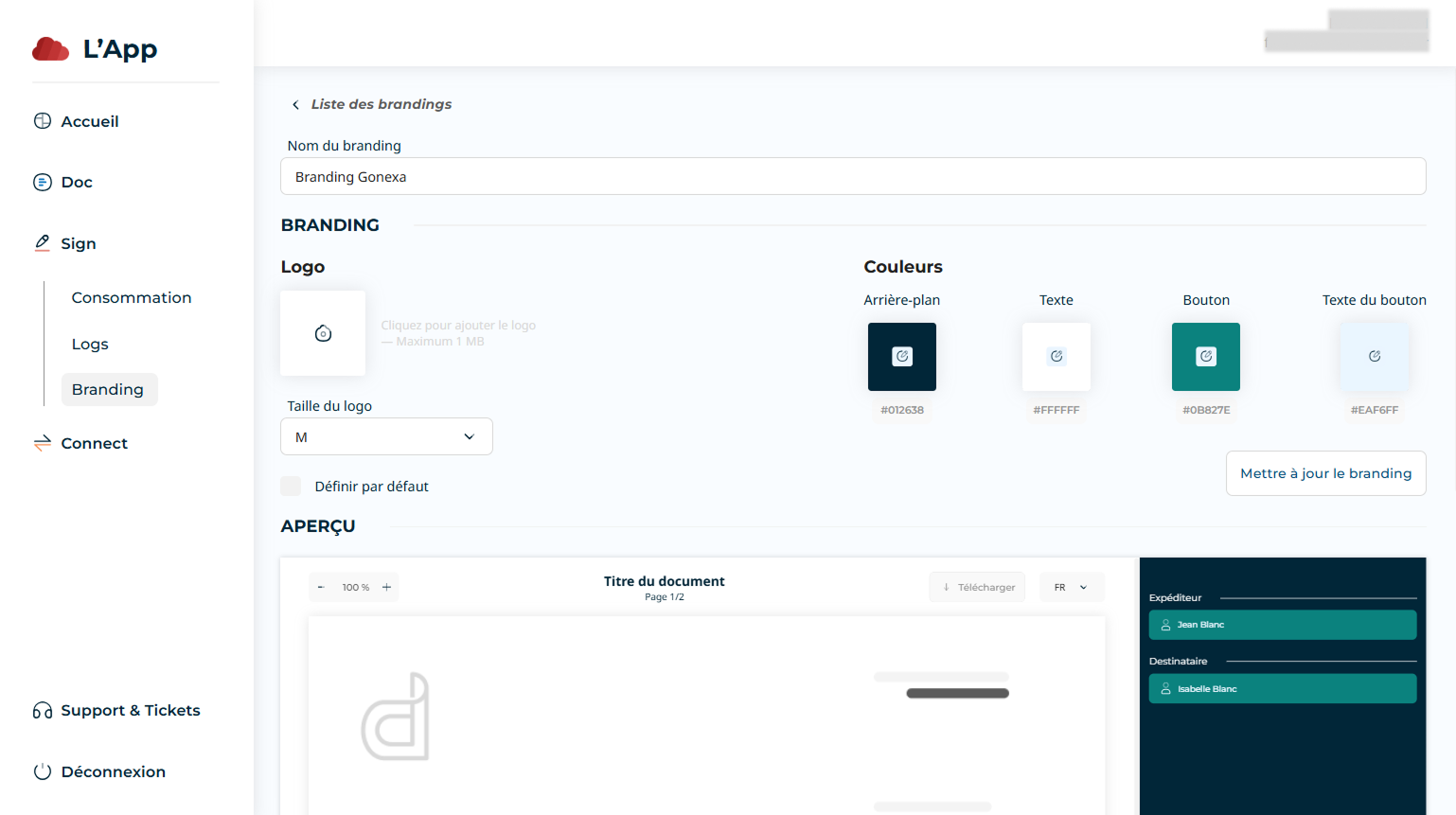
- Configure the following items
- Logo
Upload your business logo
Choose the size: S, M or L according to your needs. - Colors
You can select your colors from the proposed palette or directly enter the hexadecimal code in the format#AAAAAA.
- The color of TheBackground
- The color of Text
- The color of Button
- The color of Button text
- Set as default
Check this box if you want this Branding to be automatically applied to all your Salesforce environments connected to the App
Tip
A live preview allows you to instantly see how your customization choices look, ensuring the result meets your expectations.
Note
The default branding configured for the App will only be applied if no Branding ID is specified in the Branding field of the Gonexa Sign custom setting in Salesforce